Close Buy-Sell EA for MT5: Close Only Buy or Only Sell Positions
- Instant Download
- Lifetime Access
- Free Updates
- 24/7 Support
Code: EX71969
On a hedging account, a Buy and a Sell on the same symbol can sit open at the same time, and closing just one side means picking tickets by hand. Close Buy-Sell EA for MT5 adds two buttons to the upper-left of your chart, a blue Close Buy and a red Close Sell. Each closes every position in its own direction on that chart’s symbol.
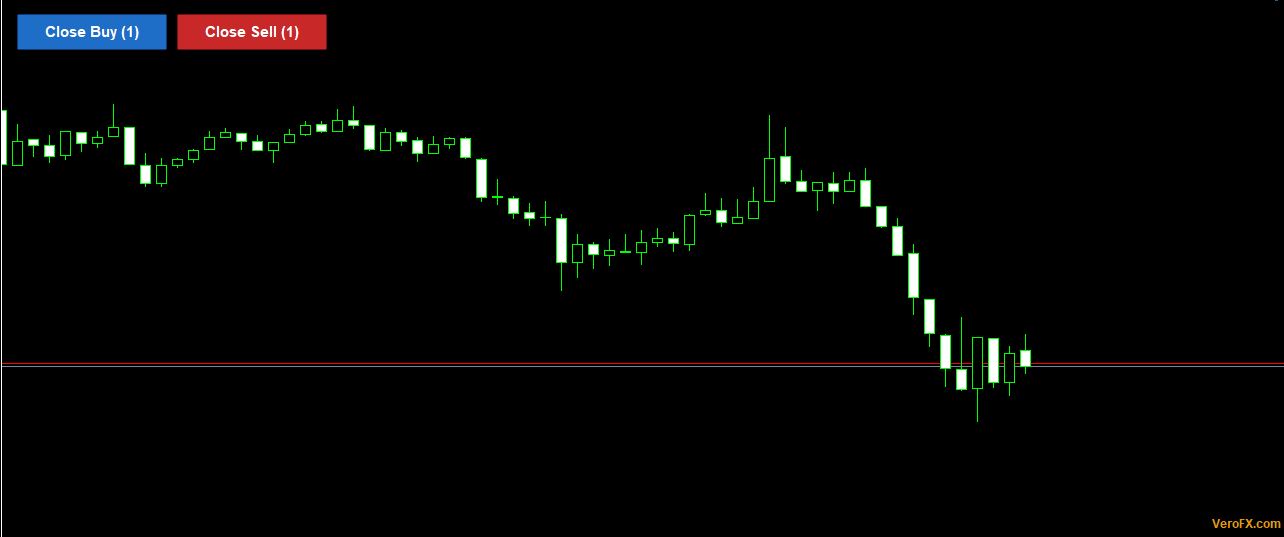
Blue for Buys, Red for Sells: What Each Button Counts
- Two buttons, two live counts. The labels read “Close Buy (1)” and “Close Sell (1)”, or whatever the current numbers are. A one-second timer keeps them current without waiting for ticks.
- Chart symbol only. Positions on other symbols are not counted and not closed.
- All magic numbers. Manual trades and trades opened by other EAs in that direction are included.
- Confirmation on by default. A Yes/No box names the direction, the symbol and the number of trades before anything closes.
- Retries built in. If your broker rejects a close, the EA tries again every 2 seconds, up to 10 attempts per click.
Direction Only: Profit and Loss Do Not Matter Here
The only test is whether the position is a Buy or a Sell. A Buy that is up, a Buy that is down and a Buy at break-even are all treated the same when you press Close Buy.
If you need to filter by result instead, a profit-only or loss-only tool is a better fit. This one answers a single question: which side do you want gone?
What Happens Between the Click and the Last Closed Position
The EA recounts positions in the chosen direction first. If there are none, it logs a note in the Experts tab and stops.
With confirmation on, the Yes/No prompt appears. Answer No and nothing changes. After Yes, the EA checks that Algo Trading is allowed. If it is not, an alert asks you to enable it and no trade is closed.
The EA then sends a market close for each position by ticket, using your slippage limit. It recounts afterward and retries what remains. If positions are still open after the 10th attempt, an alert reports how many are left and points to the Experts log.
While a close run is in progress, further clicks on either button are ignored until it finishes or the retries run out.
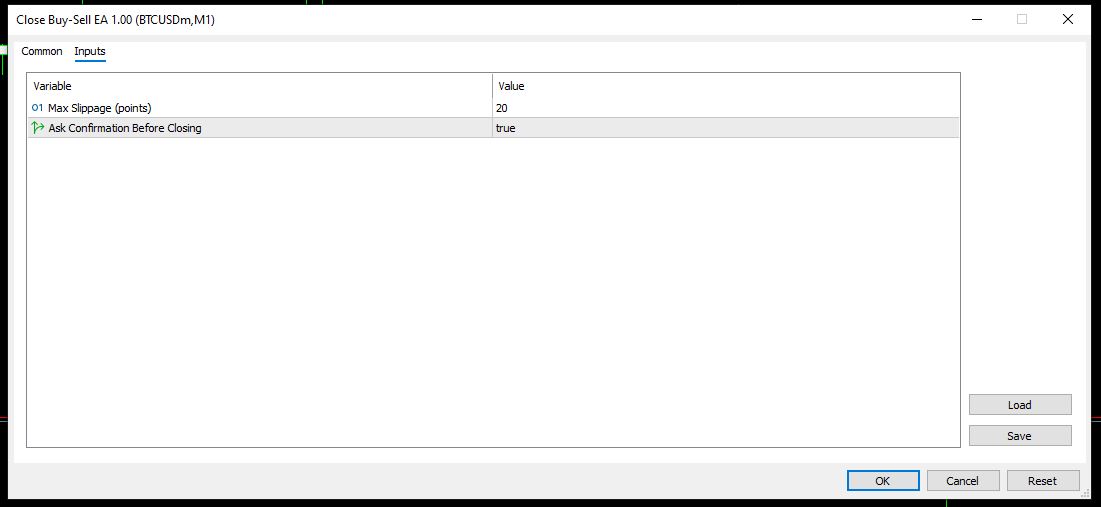
There are two inputs:
- Max Slippage (points): default 20, the largest price deviation you accept on a close.
- Ask Confirmation Before Closing: default true. Set to false to close immediately on click.
A small “VeroFX.com” label sits in the lower-right corner. Clicking it shows the site address in an alert.
Putting the Two Buttons on an MT5 Chart: Hedging and Netting Accounts
This EA is for MetaTrader 5. Compatibility may vary by broker and account type.
Copy the EA file into the MQL5\Experts folder through File > Open Data Folder, refresh the Navigator, drag it onto a chart, and turn on Allow Algo Trading. Attach one copy per symbol you want buttons for.
Account type changes what you will see. A hedging account allows Buy and Sell positions on one symbol at once, so both buttons can show counts. A netting account keeps a single net position per symbol, so normally only one button will show a count. The EA does not open trades, so it only needs the terminal open and connected when you click. Try it on a demo account first.
Suited to Hedge Managers and Multi-Entry Baskets, Not to Everything-at-Once Exits
This suits traders who run both directions on one symbol and want to remove one side quickly. It also suits traders with several scaled-in entries in one direction who prefer one click to a row of tickets.
It will not help if you want one button to close everything across all symbols, or a button that sorts by profit or loss. It also does not manage trades automatically. Nothing closes until you click.
Closing One Side of a Hedge Leaves the Other Side Exposed
- A close is final. The position leaves your account at market. Keep the confirmation prompt on unless you are certain.
- Removing one leg changes your exposure. Closing the Buys in a hedged pair leaves the Sells carrying the full directional risk. Plan for that before clicking.
- It closes winners and losers alike. Because direction is the only filter, you may realize losses and gains together.
- Fills depend on your broker. Slippage, requotes and wide spreads vary by broker and account type. A live spread reading, such as the spread watch live spread monitor alert indicator, can help you judge conditions before you click.
- Retries stop at 10. Anything still open after that stays open until you close it by hand.
- Fees are not shown. The EA does not display commissions or charges.
A broader plan for sizing and exposure is covered in the money management in trading complete guide. Only risk an amount you can afford to lose.
Questions About Hedged Positions, Mixed Results and Button Counts
Will Close Buy also close my profitable Buys?
Yes. The button closes every Buy on the chart’s symbol, whether it is in profit, at a loss or at break-even. Direction is the only filter.
Why does one button show (0)?
No positions of that direction are open on the chart’s symbol. On a netting account, a symbol holds one net position, so one button will usually read zero.
Can I close Buys on one symbol and Sells on another?
Yes, if the EA is attached to a chart for each symbol. Each copy acts only on its own chart’s symbol.
Can I turn off the confirmation box?
Yes. Set “Ask Confirmation Before Closing” to false in the inputs, and the next click closes that direction immediately.
Disclaimer
This product is provided for educational and analytical purposes only and is not financial advice. Forex and CFD trading involves a high level of risk, and you can lose some or all of your capital. Leverage can magnify both gains and losses. No product can guarantee profits, and results vary. Never trade with money you can’t afford to lose.
Expert Advisors execute trades automatically and can incur losses, including during unusual market conditions, news events, or technical failures. Backtested or past results don’t guarantee future performance. Test on a demo account first and understand the settings before using real funds.
MetaTrader, MT4, and MT5 are trademarks of their respective owners. This product is not affiliated with or endorsed by MetaQuotes Ltd.