Auto SLTP EA for MT5: Automatic Stop Loss and Take Profit Setter
- Instant Download
- Lifetime Access
- Free Updates
- 24/7 Support
Code: EX09908
Placing a trade in a hurry and leaving the stop loss and take profit fields empty is a common slip in manual trading. Auto SLTP EA for MT5 watches the positions on its chart’s symbol and fills in an empty stop loss or take profit for you, using either a fixed number of pips or a multiple of ATR. It does not open trades, and it does not move levels you have already set.
Two Ways to Size the Exit: Fixed Pips or ATR Multiples
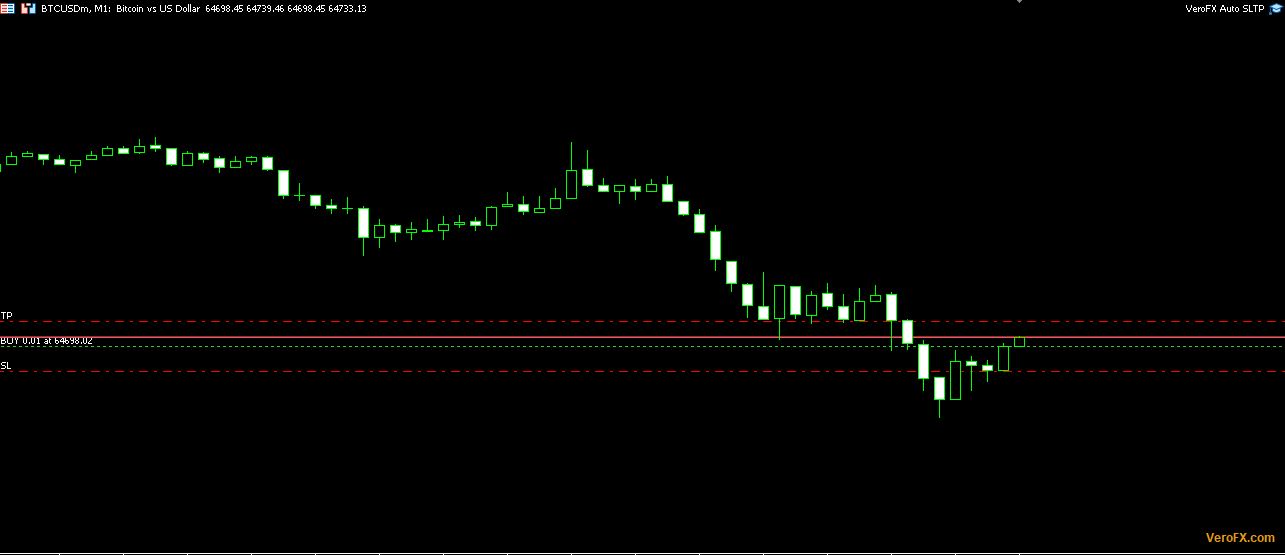
You pick one mode in the “SL/TP Mode” input. The other mode’s inputs are ignored.
| Input | Default | Used in | Notes |
|---|---|---|---|
| SL/TP Mode | Fixed Pips | Both | Choose Fixed Pips or ATR |
| Stop Loss (pips) | 100 | Fixed Pips | 0 = no SL |
| Take Profit (pips) | 100 | Fixed Pips | 0 = no TP |
| ATR Period | 14 | ATR | Must be at least 1 |
| ATR Timeframe | 1 Hour | ATR | Any standard MT5 timeframe |
| SL = ATR x Multiplier | 1.5 | ATR | 0 = no SL |
| TP = ATR x Multiplier | 3.0 | ATR | 0 = no TP |
Setting either side to 0 means that level is not added. You can use the EA for stop loss only or take profit only.
What the EA Fills In, and What It Leaves Alone
- Empty fields only. If a position has no stop loss, the EA adds one. If it has no take profit, the EA adds one. Each side is handled separately, so a position with an SL but no TP receives only a TP.
- Existing levels stay untouched. Anything you set yourself is not overwritten.
- Every magic number. Manual trades and positions from other EAs on the chart’s symbol are treated alike.
- Chart symbol only. Positions on other symbols are ignored.
- Positions already open count too. The EA checks all open positions on the symbol, so a trade opened before you attached it can receive levels as well.
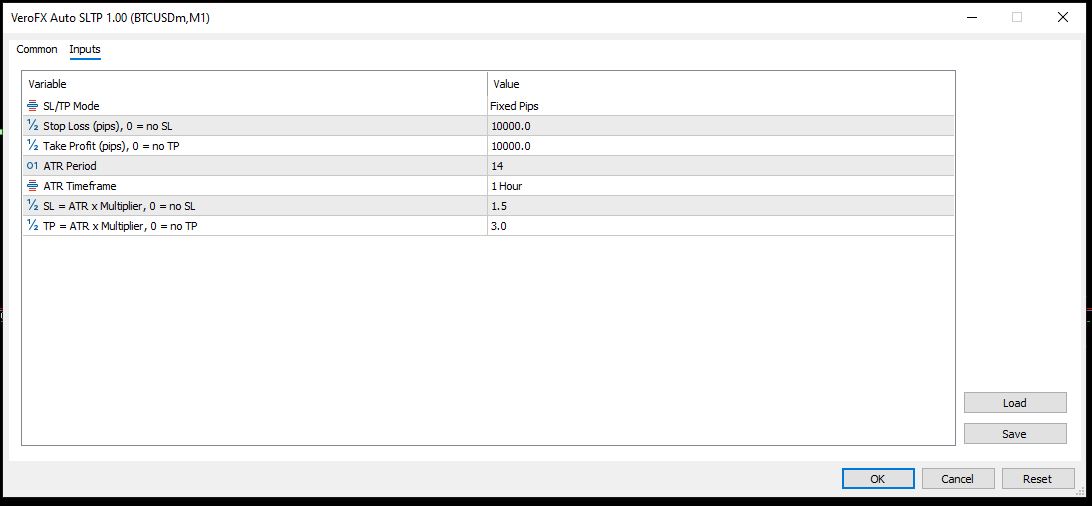
- Open price is the anchor. Distances are measured from the position’s open price, below it for a Buy’s SL and above it for a Sell’s SL, and the reverse for take profit.
From Fill to Modified Position: Ticks, the Timer and Retries
The EA checks positions on each tick, once every second on a timer so it works without ticks, and immediately after a new deal is added to your account. If a modification fails, it waits 5 seconds and tries again. The Experts tab logs each success with the ticket, symbol and levels. It also logs failures with the broker’s reason code.
In ATR mode, the EA reads the ATR value from the last closed bar of your chosen timeframe. If that value is not available, no levels are set until it is.
How the Distance Is Measured: Pip Size and Broker Stop Levels
The EA treats one pip as ten points on symbols with 3 or 5 digits, and as one point otherwise. On crypto, metals and indices, this may not match what you expect a pip to be, so check the resulting lines on the chart before trusting the numbers. The screenshots on this page used very large pip values for that reason on BTCUSD.
It also respects your broker’s minimum stop distance. If the calculated level would sit closer to the current price than the broker allows, the EA places it at the minimum permitted distance instead. This means the final level can differ from open price plus or minus your setting.
Attaching Auto SLTP EA to an MT5 Chart with Algo Trading On
Auto SLTP EA is built for MetaTrader 5. Compatibility may vary by broker and account type.
Copy the EA file into the MQL5\Experts folder through File > Open Data Folder, refresh the Navigator, and drag it onto a chart. Turn on Allow Algo Trading. It uses no DLL, so there is no Dependencies tab to approve.
Attach one copy per symbol you trade. Because it modifies positions on its own, keep the terminal open and connected. A stable connection or a VPS helps, but automation does not remove risk. Test on a demo account first to confirm how the levels land on your symbol. A small “VeroFX.com” label sits in the lower-right corner of the chart, and clicking it shows the site address.
A Fit for Traders Who Enter Manually and Want Consistent Exit Levels
This suits traders who place orders by hand and want a rule-based stop loss and take profit added each time. It also suits traders who prefer exits scaled to recent volatility instead of a fixed pip count. The volatility bands atr standard deviation indicator can help you see how ATR compares to price on your chart, and the pip value per lot indicator shows what a pip is worth for your lot size.
It is not for you if you want automatic entries, trailing stops, break-even moves or partial closes. It does not do those things. It also does not handle pending orders.
Stops and Targets Set by Rule Can Still Be Wrong for the Market
- A rule is not a read on the market. A fixed 100-pip stop may be too tight on a volatile day and too wide on a quiet one. ATR adapts to recent range, but it only describes the past.
- Stop losses are not guaranteed exits. Slippage, gaps, spread widening and requotes can fill a stop at a worse price than the level shown.
- The level can shift from your input. Broker minimum stop distances can move the level, as described above.
- Pip assumptions vary. On non-forex symbols, the pip definition may give distances far from what you intend.
- A 1:1 default is only a default. The fixed defaults set equal stop and target distances. Whether any ratio suits your approach is your decision.
- Position size still matters. The EA sets levels but does not size your trades. A tool such as the lot calculator risk based lot size indicator can help you relate stop distance to risk per trade.
Only risk an amount you can afford to lose.
Questions About Existing Trades, Magic Numbers and ATR Values
Will it change a stop loss I already placed?
No. It fills only empty stop loss or take profit fields. If you set a level yourself, the EA leaves it as it is.
Does it work on trades opened by other EAs?
Yes. It does not filter by magic number, so any position on the chart’s symbol with an empty SL or TP can receive levels.
Which ATR value does it use?
The value from the last closed bar of the timeframe you choose, using your ATR period. It is read when the EA calculates levels, so it does not update on every tick.
Can I add only a take profit?
Yes. Set the stop loss input (pips or ATR multiplier) to 0, and only a take profit will be added.
Disclaimer
This product is provided for educational and analytical purposes only and is not financial advice. Forex and CFD trading involves a high level of risk, and you can lose some or all of your capital. Leverage can magnify both gains and losses. No product can guarantee profits, and results vary. Never trade with money you can’t afford to lose.
Expert Advisors execute trades automatically and can incur losses, including during unusual market conditions, news events, or technical failures. Backtested or past results don’t guarantee future performance. Test on a demo account first and understand the settings before using real funds.
MetaTrader, MT4, and MT5 are trademarks of their respective owners. This product is not affiliated with or endorsed by MetaQuotes Ltd.