Lot Calculator: Risk-Based Lot Size Indicator for MT5
- Instant Download
- Lifetime Access
- Free Updates
- 24/7 Support
Code: IN82193
Working out position size by hand, with a balance, a risk percentage, a stop distance, and a pip value, is easy to get wrong when a setup is moving. Lot Calculator is a lot size calculator for MT5 that does the arithmetic on your chart. You enter a risk percentage and a stop loss in pips, and a panel shows the resulting lot size.
Two Inputs In, One Lot Size Out: What the Chart Panel Displays
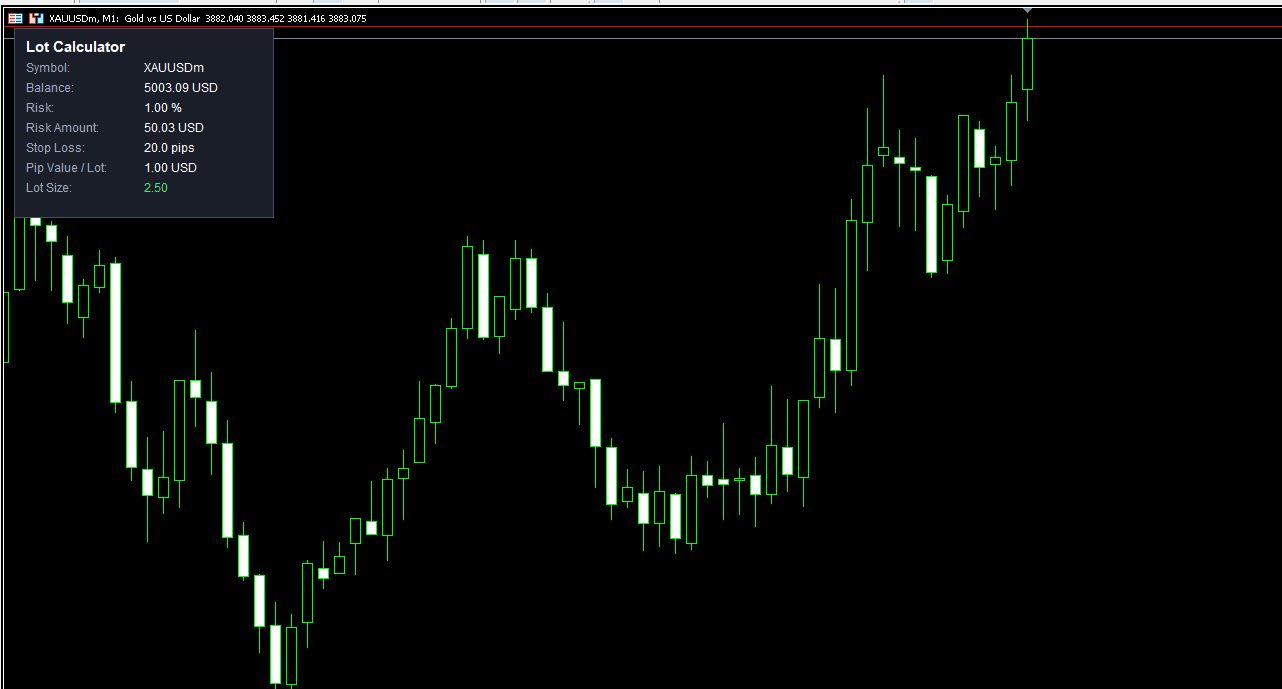
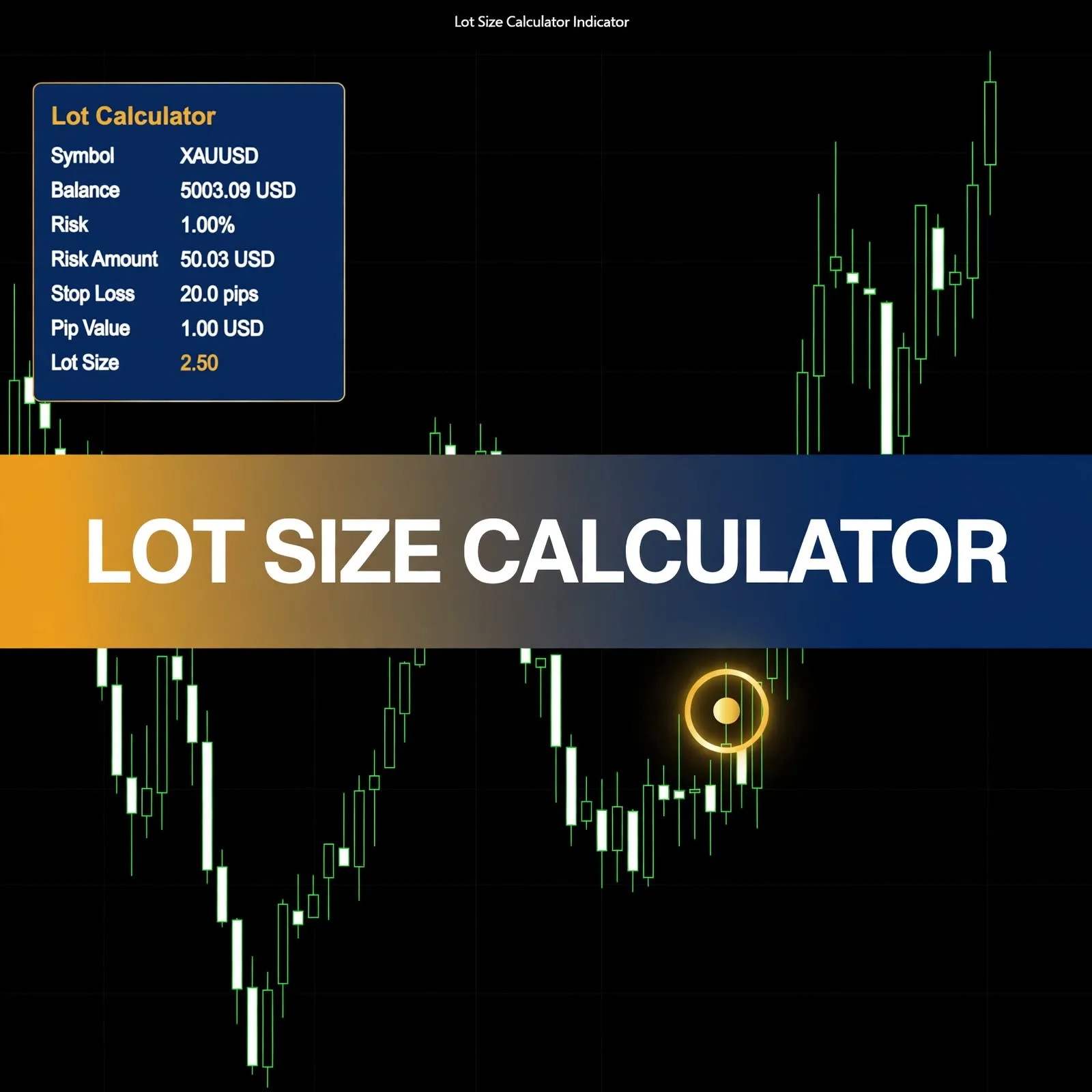
The panel in the product screenshot lists seven lines:
| Panel line | Example shown |
|---|---|
| Symbol | XAUUSDm |
| Balance | 5003.09 USD |
| Risk | 1.00 % |
| Risk Amount | 50.03 USD |
| Stop Loss | 20.0 pips |
| Pip Value / Lot | 1.00 USD |
| Lot Size | 2.50 |
The Lot Size line is highlighted in green, so the final figure stands out from the working lines above it. Seeing the risk amount in account currency next to the lot size lets you confirm that the trade risks the sum you intended.
The Risk Percent and Stop Loss Pips Settings
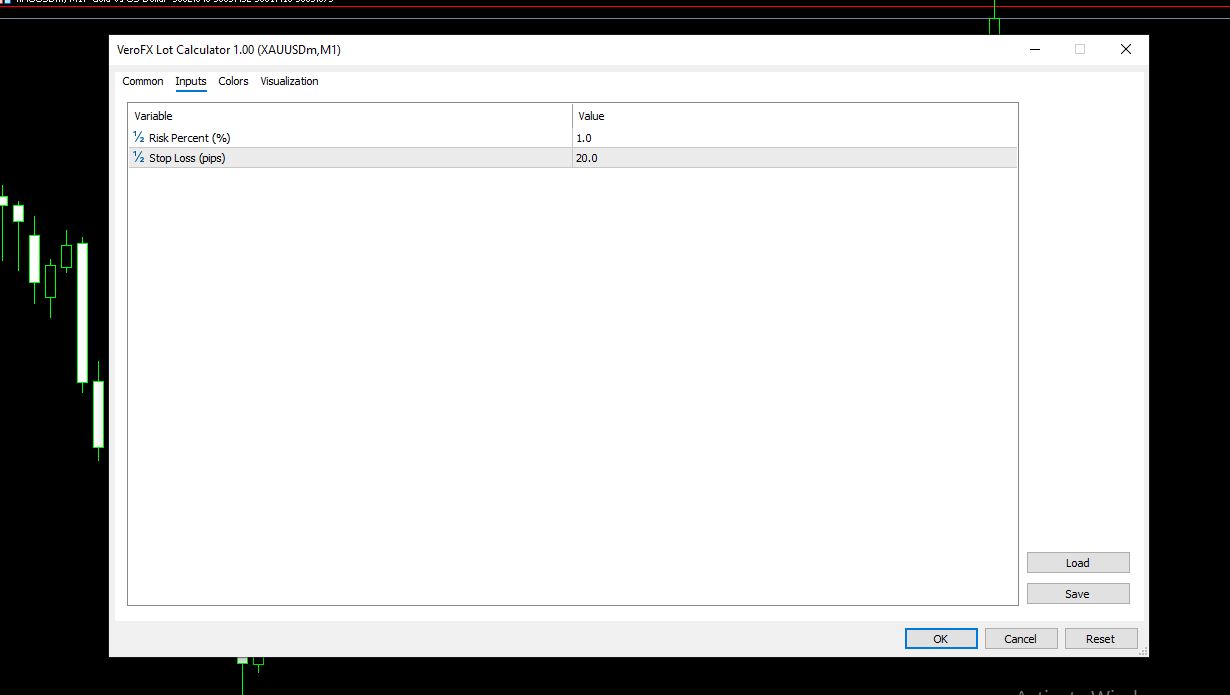
The Inputs tab has two settings:
- Risk Percent (%) is shown at 1.0. This is the share of your balance you’re willing to risk on one trade.
- Stop Loss (pips) is shown at 20.0. This is the distance from entry to your stop, measured in pips.
The values in the screenshot are example settings, not recommendations. Choose a risk percentage that fits your own plan and a stop distance that fits your setup. The settings window also includes Common, Colors, and Visualization tabs for display adjustments.
How the Lot Size Is Worked Out From Balance, Risk, and Pip Value
The panel follows the standard position-sizing arithmetic:
- Risk amount = balance × risk percent. In the screenshot, 1.00 % of 5003.09 USD is 50.03 USD.
- Cost of the stop per lot = stop loss in pips × pip value per lot. Here that’s 20 pips × 1.00 USD.
- Lot size = risk amount ÷ cost of the stop per lot, so 50.03 ÷ 20 = 2.50 lots.
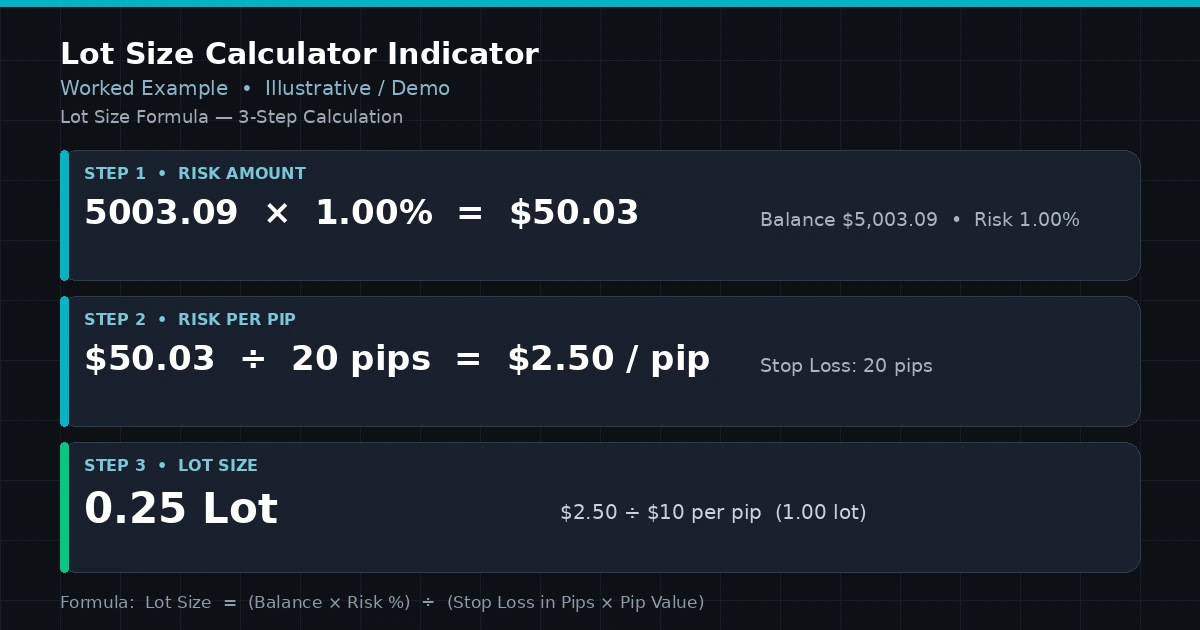
Because pip value changes by symbol and account currency, the same risk and stop can produce very different lot sizes on different instruments. That’s the main reason to calculate rather than reuse a fixed lot. The relationship between pip value and your account currency is covered in account currency pip value profit calculation.
Using Lot Calculator on an M1 Gold Chart and Other Symbols
The screenshots were taken on a gold symbol (XAUUSDm) on an M1 chart. Which other symbols and timeframes it supports isn’t specified on this page, so test on a demo account with your own instruments before relying on the output. Compatibility may vary by broker and account type.
Before using any result, check what a “pip” means on your symbol. On metals, indices, and some other instruments, brokers define pip size and contract size differently, so compare the panel’s pip value with your broker’s contract specification.
Installing a Lot Calculator .ex5 File in MT5
MT5 indicators are normally installed as .ex5 files. In MT5, choose File > Open Data Folder, then MQL5 > Indicators, and copy the file there. Refresh the Navigator panel (or restart MT5), then drag Lot Calculator onto a chart and set the two inputs.
Built for Traders Who Size Positions by Risk, Not by Habit
Likely a good fit if you:
- Set risk as a percentage of balance and want the lot size worked out for you
- Change stop distances between trades and need the volume to follow
- Want the working numbers visible, not just a final figure
Probably not for you if you:
- Want an indicator that finds entries or picks stop levels
- Expect it to place or manage orders for you
- Prefer to trade a fixed lot size regardless of stop distance
Where a Lot Size Figure Can Still Lead You Astray
A calculated lot size is only as sound as the numbers behind it:
- The stop is your input. If the stop distance doesn’t match where you’d actually exit, the calculated risk won’t match your real risk.
- Broker limits apply. Brokers set minimum, maximum, and step sizes for volume, so a result like 2.50 may need to be rounded or adjusted when you place the order.
- Slippage and gaps. A stop can fill beyond its level in fast markets, so actual loss can exceed the intended risk amount.
- Spread and commission. These aren’t part of the stop-based formula and add to the cost of a trade.
- Pip definitions vary. A mismatch between the panel’s pip value and your broker’s contract specification will skew the result.
- Balance changes. The risk amount follows your balance, so it moves as your account does.
Position sizing is one part of risk control. For the wider picture, read the money management in trading complete guide. For stop placement and daily limits, see the forex risk management complete guide.
Questions About Pip Value, Lot Rounding, and Risk Percent
Does the calculator choose my stop loss?
No. You enter the stop in pips, and the lot size is calculated from it. A different stop gives a different lot size.
Why might my broker not accept the exact lot size shown?
Brokers set minimum lot, lot step, and maximum lot rules per symbol. If the figure falls between steps, you’ll need to round it to a size your broker allows.
What risk percentage should I use?
That’s your decision and depends on your plan and tolerance for loss. The 1.0 shown is an example value from the screenshot, not a recommendation.
Which symbols and timeframes does it work on?
The screenshots show a gold symbol on M1. Other symbols and timeframes aren’t specified here, so test on a demo account first. Compatibility may vary by broker and account type.
Disclaimer
This product is provided for educational and analytical purposes only and is not financial advice. Forex and CFD trading involves a high level of risk, and you can lose some or all of your capital. Leverage can magnify both gains and losses. No product can guarantee profits, and results vary. Never trade with money you can’t afford to lose.
Indicators display information based on historical price data and may produce misleading or delayed signals in some market conditions. They should be used as one part of a complete trading plan with proper risk management.
MetaTrader, MT4, and MT5 are trademarks of their respective owners. This product is not affiliated with or endorsed by MetaQuotes Ltd.