Money Flow V1 Expert Advisor for MT5: EMA Pullback Stop-Order EA
- Instant Download
- Lifetime Access
- Free Updates
- 24/7 Support
Code: EX46858
Open a Money Flow V1 chart and you will see very little: one EMA, and at most one pending Buy Stop or Sell Stop waiting beyond a recent candle. This Money Flow V1 expert advisor for MT5 keeps entries rule-based. It trades in the direction of the side price has closed on relative to the EMA, and it waits for a small pullback before committing. Stops, targets and optional safeguards sit in one Inputs tab.
A Single Stop Order Beyond the Last Opposite-Colored Candle
On each new bar of the entry timeframe (M1 with a 20-period EMA by default, both adjustable), the EA reads the last closed candle and the EMA.
- Price above the EMA, last candle bearish: a Buy Stop goes at that candle’s high plus the buffer (2 pips by default).
- Price below the EMA, last candle bullish: a Sell Stop goes at that candle’s low minus the buffer.
- Order lifetime: the stop stays in place until it fills or price closes on the other side of the EMA, which cancels it.
- One trade at a time: while a position is open for the EA’s magic number, no new pending orders are placed and leftovers are cleared.
The EA does not count candles after a cross. It uses the first valid pullback candle once price is on a given side of the EMA. For background on trending setups, see trend-following strategy for beginners.
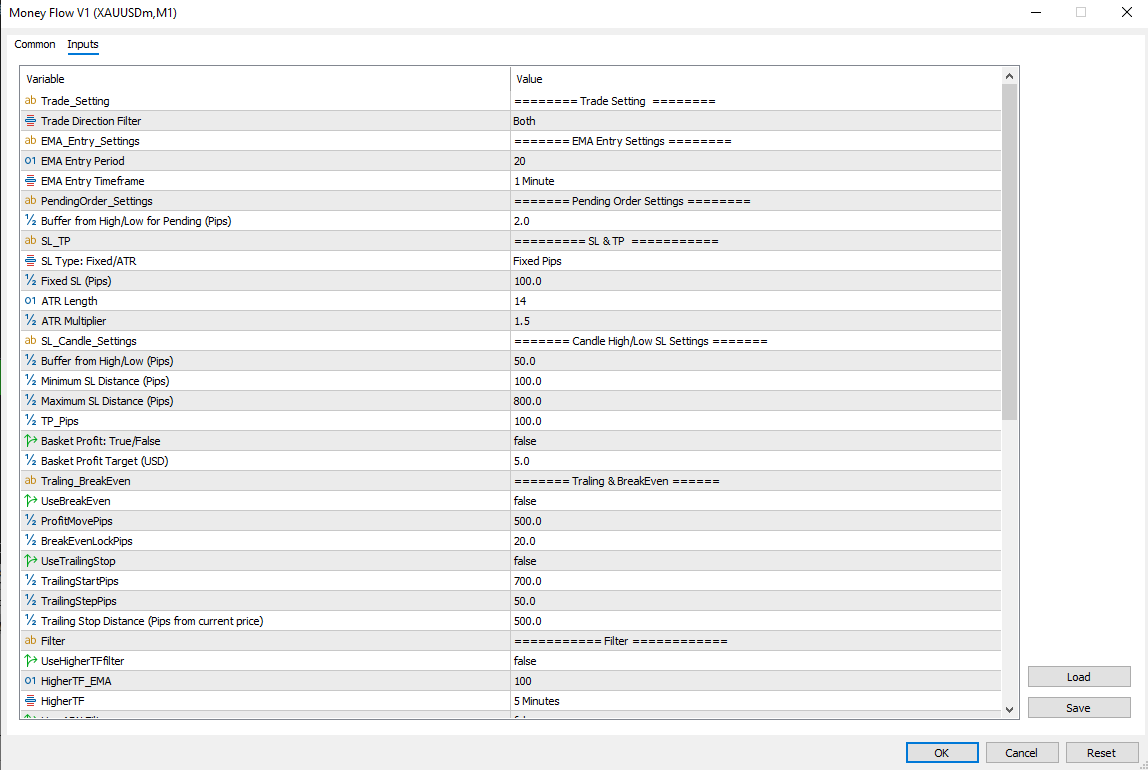
Defaults at a Glance for Entry, Stops, Filters and Safeguards
| Group | Defaults |
|---|---|
| Direction | Both (or Only Buy / Only Sell) |
| EMA entry | Period 20, 1 Minute |
| Pending buffer | 2 pips |
| Take profit | 100 pips |
| Basket profit | Off, 5 USD target |
| Higher-timeframe filter | Off, 100 EMA on 5 Minutes |
| ADX filter | Off, period 14, minimum 20 |
| Daily target | Off, 20 USD |
| Max drawdown protection | On, 10,000 USD |
| Slippage / magic number | 300 points / 100 |
| Martingale | Off, StartLot 0.01, ×1.2, up to 100 steps |
Choosing Between Fixed, ATR and Candle-Based Stops
Money Flow V1 offers three SL Type options, so you can match the stop to how you read the chart.
- Fixed Pips (100 by default) gives the same distance on every trade, so risk per trade is easy to reason about.
- ATR-based (length 14, multiplier 1.5) scales the stop with current volatility. It gives calm periods a tighter stop and fast periods a wider one.
- Candle High/Low places the stop beyond the previous candle’s extreme plus a 50-pip buffer, kept between a 100-pip minimum and an 800-pip maximum.
All distances are in pips. On 3- and 5-digit symbols one pip equals ten points, otherwise one point. The account currency and pip value guide helps you turn those distances into money, so you can size inputs with confidence.
Optional Extras That Stay Off Until You Switch Them On
- Break-even: after 500 pips of profit the stop moves to entry plus a 20-pip lock.
- Trailing stop: begins at 700 pips of profit and holds the stop 500 pips behind current price.
- Higher-timeframe filter: buys need the higher-timeframe close above its EMA (100 on M5 by default), and sells need it below.
- ADX filter: new entries wait until the last closed bar’s ADX reaches your minimum.
- Daily target: once realized profit for the day reaches your figure, no new pending orders are placed until the next day.
- Basket profit: when a lot-step cycle is carrying losses, the basket closes once net profit covers those losses plus your target.
- On-chart readout: today’s profit, cycle loss, lot step and lot, pending stop prices and basket progress.
Martingale Lot Steps: Off by Default, Clear About the Trade-Off
Money Flow V1 includes martingale-style lot scaling. By default it is off, and the EA trades a fixed 0.01 lot.
When you turn it on, each stop-loss hit raises the lot step by one. Lot size is StartLot × multiplier^step, rounded to your broker’s lot step and limits. The step resets once the cycle’s losses are recovered or a take profit hits. Because lots grow after losses, choose a step limit your margin can carry. The default ceiling is 100 steps, which is generous. A lot calculator can help you sanity-check lot sizes.
The EA stores its lot step and cycle-loss figures in MT5 global variables and a small CSV file in the common folder. A terminal restart therefore picks up an active cycle instead of starting over.
Running Money Flow V1 on an MT5 Chart: Setup Notes
Money Flow V1 is built for MetaTrader 5. Compatibility may vary by broker and account type, including pending-order rules and minimum stop distances.
Place the EA file in MQL5/Experts via File > Open Data Folder, then refresh the Navigator and drag it onto your chart. Enable Algo Trading in the terminal and on the EA’s Common tab, review the Inputs tab, and run it on a demo account first. Like any EA, it only works while the terminal is running and connected, which is why many traders use a VPS. Give each chart its own magic number.
Built for Traders Who Want Pullback Entries Without Candle-Count Rules
It fits you if you:
- Like entries that wait for one opposite-colored candle before committing.
- Want to pick your own stop-loss method and decide which extras stay off.
- Are willing to test settings on demo or in the Strategy Tester first.
It does not fit you if you:
- Expect guaranteed outcomes or a fully hands-off system.
- Plan to use martingale with a small balance and a high step limit.
- Want the EA to choose settings for you.
Whipsaws, Stop-Order Fills and Lot Growth: The Honest Limits
- Choppy markets: price can cross the EMA repeatedly without follow-through. The ADX and higher-timeframe filters help but cannot remove this.
- Fills: on M1, spread and slippage can change where stop orders fill compared with a backtest. Live results can differ from tested ones.
- Martingale: larger lots after losses can deepen drawdowns and use more margin.
- Drawdown cap: the 10,000 USD default is high for small accounts, so set it to a figure that fits yours.
Why risk management matters more than strategy is a useful read before you go live. Automation does not make trading risk-free. Risk only money you can afford to lose.
Answers on Money Flow V1’s Stop Orders, Magic Number and Restart Behavior
Does it enter as soon as price crosses the EMA?
No. It waits for a closed candle of the opposite color, then places a stop order beyond its high or low. A trade opens only if price reaches that level.
Is there a candle-count limit after a cross?
No. The EA uses the first valid pullback candle while price stays on one side of the EMA, and the order is cancelled if price closes on the other side.
What happens if I restart MT5 mid-cycle?
It reloads its saved lot step and cycle-loss tracking, so an active cycle continues.
Can I run it on several charts?
Yes. Set a different magic number on each chart, since the EA tracks state per symbol and magic number.
Disclaimer
For educational and analytical use only; not financial advice. Forex and CFD trading carries a high level of risk, and you can lose some or all of your capital. No product can guarantee profits, and results vary. Past or backtested results don’t guarantee future performance. Indicators can give misleading or delayed signals, and Expert Advisors can incur losses in unusual market conditions or during technical failures. Test on a demo account first, and never trade with money you can’t afford to lose.
MetaTrader, MT4, and MT5 are trademarks of their respective owners. This product is not affiliated with or endorsed by MetaQuotes Ltd.