Money Tree V8 RSI Expert Advisor for MT5
- Instant Download
- Lifetime Access
- Free Updates
- 24/7 Support
Code: EX64873
On a 5-minute chart, RSI dips under 30 and then climbs back above it. Money Tree V8, an RSI expert advisor for MT5, treats that re-cross as its trade trigger in both directions and attaches a stop-loss and take-profit to every order. Its most distinctive feature is a 45-row lot table that moves up after stop-outs, so the risk section deserves a careful read.
RSI Re-Crosses, Preset Stops and a 45-Row Lot Table
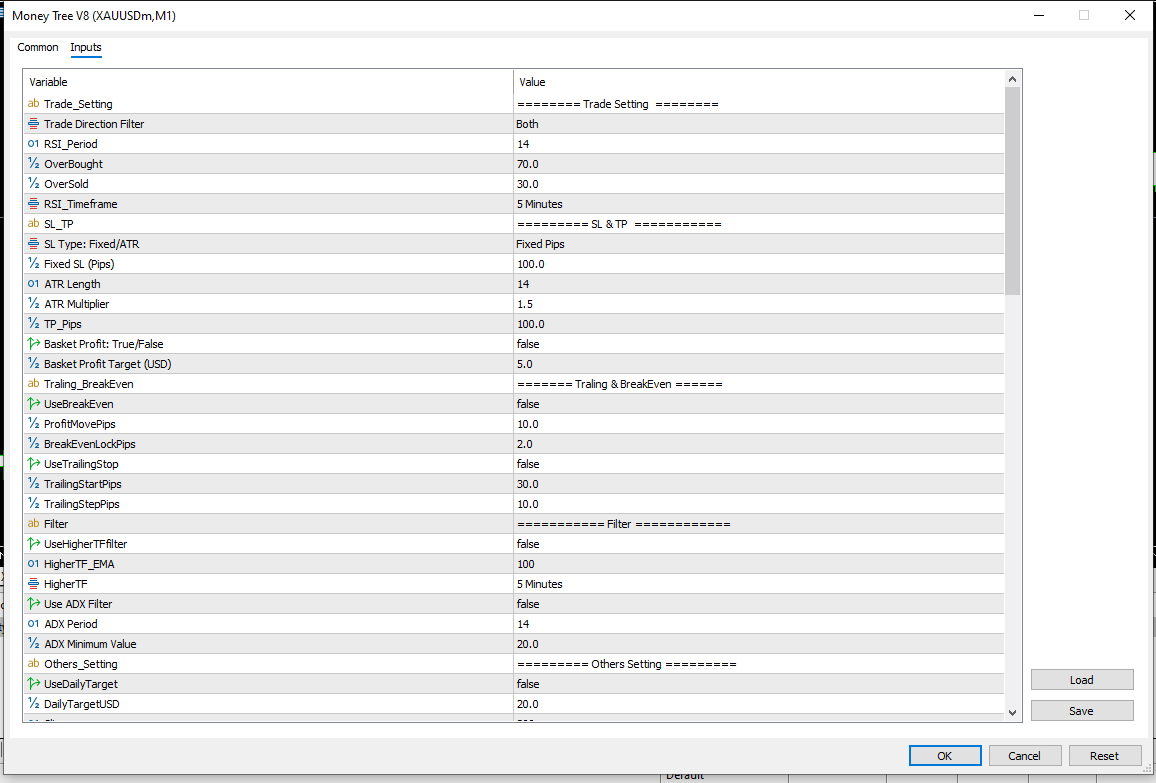
- Entries on closed bars. A buy follows RSI moving back up through the oversold level (30 by default). A sell follows RSI moving back down through the overbought level (70). The RSI period (14) and RSI timeframe (5 minutes) are inputs.
- Direction control. Trade both sides, buys only, or sells only.
- A stop and a target on every order. The stop is either a fixed pip distance (100 by default) or ATR-based (ATR length 14, multiplier 1.5). The take-profit is a fixed pip distance (100).
- Optional break-even and trailing. Both are off by default. Each can move the stop after the trade gains a set number of pips.
- Optional filters. A higher-timeframe EMA filter and an ADX minimum-strength filter can block entries. Both are off by default.
- Session limits. An optional daily target stops new trades once the day’s closed profit reaches it. A maximum drawdown cutoff is on by default.
- On-chart readout. The chart shows today’s closed profit and the running cycle loss, plus basket progress when that mode is active.
One Trade at a Time: How Each Stop-Out Moves the Lot Size Up the Table
The EA holds a single position per symbol and magic number. It looks for a new signal only when a new bar forms on the RSI timeframe. Lot size comes from a table of 45 values you can edit, running from 0.01 up to 6.00 in the defaults.
When a trade closes at its stop-loss, the next trade uses the next row of the table (a larger lot), and the loss is added to a running cycle-loss figure. A winning trade that is smaller than the cycle loss reduces it but keeps the same lot. Once the cycle loss is fully recovered, the table returns to the first row.
With the basket option enabled, orders placed during a loss cycle carry no take-profit. The EA instead closes the trade when its floating profit reaches the cycle loss plus the basket target (5 USD by default). The stop-loss stays in place. This is a martingale-style loss-recovery approach, with the lot increments taken from your table instead of a fixed multiplier.
If you want RSI visible on the chart while you study how entries line up, VeroFX lists a separate RSI signal indicator for MT5.
Settings by Group, With the Defaults From the Inputs Tab
| Group | Defaults | Notes |
|---|---|---|
| Entry | RSI 14, levels 70/30, 5-minute RSI timeframe, both directions | Read from closed bars |
| Exits | Fixed stop 100 pips, take-profit 100 pips | ATR type uses length 14, multiplier 1.5 |
| Basket | Off, target 5.0 USD | Adds to the cycle loss before closing |
| Break-even | Off, trigger 10 pips, lock 2 pips | Moves the stop beyond entry |
| Trailing | Off, starts at 30 pips, 10 pips behind price | Follows price while in profit |
| Filters | EMA 100 on 5 minutes (off), ADX 14 with minimum 20 (off) | EMA compares the last closed candle’s close |
| Limits | Daily target off (20 USD), max drawdown on (10,000 USD), slippage 300 points | Magic number 8888 |
| Lots | 45 rows, 0.01 to 6.00 | Fully editable |
Attaching It to MT5: Which Timeframe Each Setting Reads, and What a Restart Clears
Money Tree V8 is built for MetaTrader 5. The screenshots show it on an XAUUSDm M1 chart, with the RSI timeframe set separately to 5 minutes. Compatibility may vary by broker and account type.
Copy the EA file into the MQL5 → Experts folder, refresh the Navigator, drag it onto a chart, and enable Algo Trading. Review the inputs before confirming.
- Timeframes differ by setting. RSI and ADX read the RSI timeframe. The EMA filter reads its own timeframe. ATR-based stops read the chart’s current timeframe, so the chart you attach it to matters if you choose ATR stops.
- Lot values are sent as typed. Each value in the table must fit your broker’s minimum, maximum and step, or the order may be rejected.
- A restart clears the lot step. Every time the EA is attached or reloaded, it resets the lot step, cycle loss and today’s profit tally to zero. An interrupted loss cycle is not remembered.
- The terminal must stay running. Automated trading depends on a stable connection. Many traders use a VPS for this.
A Fit for Traders Who Will Rework the Lot Table, Not for Hands-Off or Fixed-Lot Users
This EA suits traders who understand loss-recovery lot progressions and are willing to edit the 45 rows to match their account size and risk limits. The lot calculator indicator can help you translate a given lot into risk on your own account.
It is a poor fit if you want one fixed lot throughout, a small account that cannot carry the upper rows of the table, or a set-and-forget tool. Anyone expecting guaranteed outcomes should skip it.
What Stepping Up Lots After Stop-Outs Can Do to a Balance
Lot sizes in this EA grow after losses, and the lot values are fixed numbers, not scaled to your balance. With the default table and the default 100-pip stop, ten stop-outs in a row would trade lots that add up to 0.80. The tenth trade alone would be 0.20 lots, twenty times the first. The table tops out at 6.00 lots, and the EA stays on that row until a recovery resets it.
- Partial wins keep the lot high. A small win reduces the cycle loss but does not reset the table, so exposure stays elevated.
- Basket mode removes the take-profit. Trades placed during a loss cycle run until the basket target or the stop-loss is reached, so a gain can reverse before the target.
- The drawdown cutoff is a loose limit. It measures the drop from your highest balance to current equity across the account. The default of 10,000 USD would not trigger on a smaller account. When it does trigger, the EA closes its trades and resets the lot step.
- RSI re-crosses lose in strong trends. Price can keep moving after an oversold or overbought reading.
- Execution costs apply. Spread, slippage and requotes affect both entries and stops, and backtests rarely match live fills.
Test on a demo account, and risk only money you can afford to lose. The money management in trading guide covers sizing rules in more depth.
Questions About Restarts, Basket Targets and Which Timeframe Is Read
Does restarting the EA reset the lot step?
Yes. Attaching or reloading it sets the lot step to the first row and clears the cycle loss and daily tally. Stops and targets already on an open trade stay with that trade, but the EA no longer remembers the earlier losses.
What does the basket target compare?
When basket profit is enabled and a loss cycle is active, the EA closes the open trade once its floating profit reaches the cycle loss plus the target. Without a loss cycle, normal take-profit orders apply.
Which timeframe do the filters use?
The ADX filter reads the RSI timeframe. The EMA filter has its own timeframe input. ATR-based stops use the chart’s current timeframe.
Can it trade only buys or only sells?
Yes. The direction filter offers both sides, buys only or sells only.
Disclaimer
For educational and analytical use only; not financial advice. Forex and CFD trading carries a high level of risk, and you can lose some or all of your capital. No product can guarantee profits, and results vary. Past or backtested results don’t guarantee future performance. Indicators can give misleading or delayed signals, and Expert Advisors can incur losses in unusual market conditions or during technical failures. Test on a demo account first, and never trade with money you can’t afford to lose.
MetaTrader, MT4, and MT5 are trademarks of their respective owners. This product is not affiliated with or endorsed by MetaQuotes Ltd.