Delta Prime V1 Expert Advisor for MT5: EMA Cross Pending-Order EA
- Instant Download
- Lifetime Access
- Free Updates
- 24/7 Support
Code: EX98628
An EMA cross on its own is just a line being crossed. Delta Prime V1 is an expert advisor for MT5 that treats the cross as step one. After price closes on the other side of the EMA, it looks for a pullback candle and places a Buy Stop or Sell Stop just beyond that candle’s extreme. Entry, stop loss, take profit and filters are all adjustable in the Inputs tab.
From a Close Beyond the 20 EMA to a Buy Stop Above the Pullback Candle
Delta Prime V1 evaluates the chart once per new bar of the entry timeframe. By default that is a 20-period EMA on M1, and you can change both.
- Buy side: price closes above the EMA, and the last closed candle is bearish. The EA places a Buy Stop at that candle’s high plus a small buffer (2 pips by default).
- Sell side: price closes below the EMA, and the last closed candle is bullish. The EA places a Sell Stop at that candle’s low minus the same buffer.
- Candle check: with Check Candle on (3 candles by default), the EA looks for the pullback candle during the first three new bars after the cross. With it off, it keeps looking on every new bar while price stays on that side of the EMA.
- Cleanup: an opposite cross removes the old pending order. Once a position is open for the EA’s magic number, leftover pending orders are cleared and no new ones are placed until it closes.
If you want background on EMA crossovers, the 20 and 50 EMA crossover strategy guide covers the two-line version. Delta Prime V1 compares price to a single EMA instead.
Reading the Inputs Tab, Group by Group
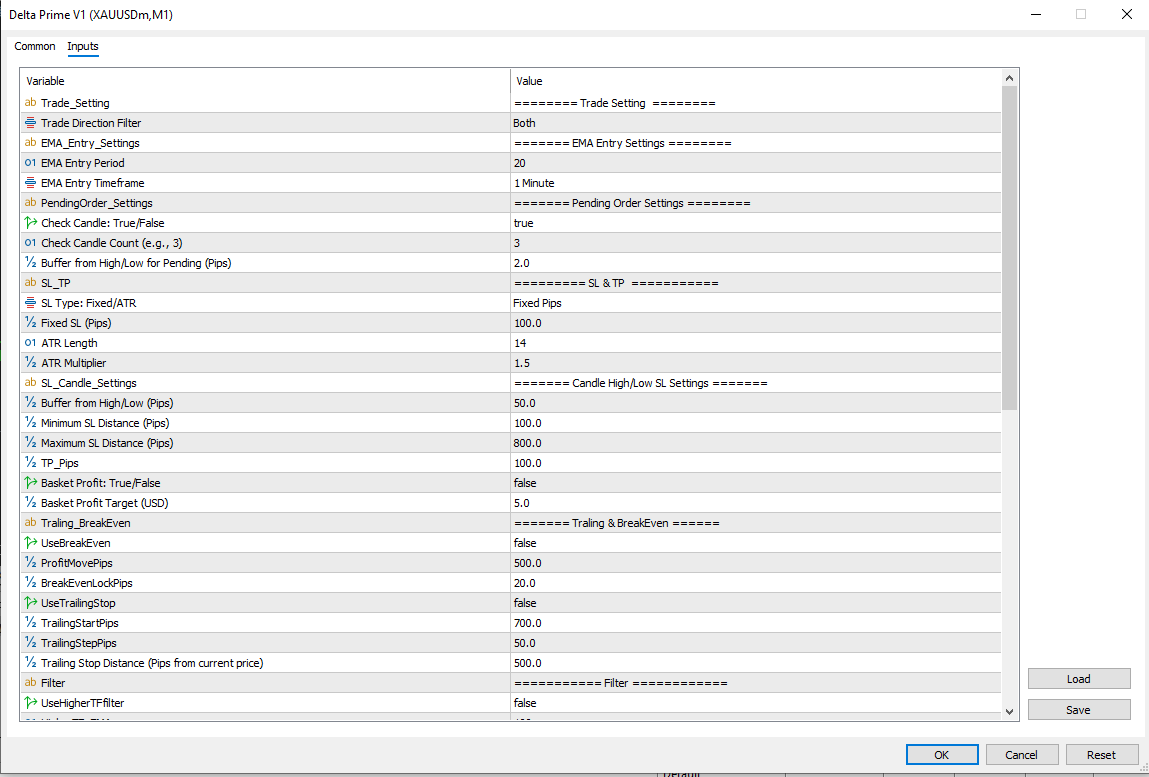
Every control is in the settings panel, and each group below can be tuned on its own.
Direction, EMA Period and Pending Buffer
- Trade Direction Filter: Both, Only Buy or Only Sell. Choose one side if you only want to trade a single direction.
- EMA Entry Period and Timeframe: default 20 on 1 Minute. Both are free inputs, so you can match them to the chart you prefer.
- Buffer from High/Low: how far beyond the pullback candle the stop order sits. The default is 2 pips.
Three Stop-Loss Methods and a 100-Pip Take Profit
Pick the SL Type that suits your chart.
- Fixed Pips: 100 by default.
- ATR-based: ATR length 14 with a 1.5 multiplier by default.
- Candle High/Low: the previous candle’s extreme plus a 50-pip buffer, kept between a 100-pip minimum and an 800-pip maximum.
Take profit is set in pips (100 by default). Pip distances follow your symbol’s digits: on 3- and 5-digit symbols one pip is ten points, otherwise it is one point. Check how your symbol is quoted before choosing distances, and your numbers will behave as you expect.
Break-Even and Trailing Stop
Both are off by default and ready when you want them.
- Break-even: after a set profit (500 pips by default), the stop moves to entry plus a locked amount (20 pips by default).
- Trailing stop: starts at 700 pips of profit and keeps the stop 500 pips from current price.
Higher-Timeframe EMA and ADX Filters
- Higher-timeframe filter: off by default. When on, it uses a 100 EMA on M5 so buys require the higher-timeframe close above that EMA and sells require it below.
- ADX filter: off by default. When on, new entries are allowed only when the last closed bar’s ADX (period 14) is at or above your minimum (20 by default).
Daily Target, Drawdown Cap, Magic Number and the On-Chart Readout
- Daily Target: off by default, 20 USD. Once the day’s realized profit reaches it, no new pending orders are placed until the next day.
- Max Drawdown Protection: on by default at 10,000 USD. When equity falls that far below peak balance, the EA closes its positions and removes its pending orders. Set the figure to suit your own account size.
- Slippage and Magic Number: 300 points and 100 by default. Use a different magic number on each chart.
- On-chart readout: today’s profit, cycle loss, current lot step and lot size, plus pending order prices and basket progress when relevant.
Optional Martingale Lot Steps and Basket Profit
Delta Prime V1 includes martingale-style lot scaling. It is off by default, and the EA trades a fixed StartLot of 0.01 until you turn it on.
When enabled, each stop-loss hit raises the lot step by one. Lot size is StartLot × multiplier^step (multiplier 1.2 by default), rounded to your broker’s lot step and limits. The step resets after the cycle’s losses are recovered or a take profit hits. Maximum Martingale Steps is 100 by default. Choose a number your margin can realistically carry, and see money management in trading for sizing background.
Basket Profit (off by default, 5 USD target) works alongside this. While a cycle carries losses, orders go out without a fixed take profit. The EA closes the basket once net profit covers the accumulated cycle loss plus your target.
The EA saves its lot step and cycle-loss tracking to MT5 global variables and a small CSV in the terminal’s common folder. A terminal restart does not wipe an active cycle.
MT5 Only: Attaching Delta Prime V1 and Turning On AutoTrading
Delta Prime V1 is built for MetaTrader 5. Compatibility may vary by broker and account type, including pending-order rules and minimum stop distances.
To attach it:
- Put the EA file in the MQL5/Experts folder (File > Open Data Folder in MT5).
- Refresh the Navigator.
- Drag the EA onto a chart.
- Enable Algo Trading in the terminal and on the EA’s Common tab.
- Review the Inputs tab.
Run it on a demo account first. Like any EA, it only works while the terminal is running and connected, which is why many traders use a VPS.
A Fit for Traders Who Like Explicit Rules and Adjustable Safeguards
Delta Prime V1 suits you if:
- You like pullback-style entries built on a single EMA.
- You want to choose your own stop-loss method and decide which optional tools stay off.
- You are comfortable testing settings on demo or in the Strategy Tester before going live.
It is not for you if:
- You expect guaranteed outcomes or a hands-off system.
- You plan to run martingale with a small balance and a high step limit.
- You want the EA to choose settings for you.
Where an EMA Pullback EA With Optional Martingale Can Go Wrong
- Ranging markets: price can cross the EMA repeatedly without follow-through. The ADX and higher-timeframe filters exist for this, but no filter removes it.
- Stop-order fills: on fast, low-timeframe charts such as M1, spread and slippage can change fills compared with a backtest. Live results can differ from tested ones.
- Martingale: larger lots after losses can deepen drawdowns and use more margin. This is the main added risk when the option is on.
- Drawdown cap: the default is 10,000 USD, so lower it if your account is smaller.
For a broader framework, see this forex risk management complete guide. Automation does not make trading risk-free. Risk only money you can afford to lose.
Questions About Pending Orders, Martingale, and Restarts
Does Delta Prime V1 enter the moment price crosses the EMA?
No. It waits for a closed pullback candle in the direction of the cross, then places a stop order beyond that candle’s high or low. The trade opens only if price reaches that level.
Is martingale active by default?
No. UseMartingale is false, so the EA uses a fixed 0.01 StartLot until you enable it and set the multiplier and step limit.
What happens if I restart MT5 in the middle of a cycle?
The EA reloads its saved lot step and cycle-loss tracking from global variables and its CSV file, so an active cycle continues from where it was.
Can I run it on more than one chart?
Yes. Give each chart its own Magic Number, since the EA stores its state per symbol and magic number.
Disclaimer
For educational and analytical use only; not financial advice. Forex and CFD trading carries a high level of risk, and you can lose some or all of your capital. No product can guarantee profits, and results vary. Past or backtested results don’t guarantee future performance. Indicators can give misleading or delayed signals, and Expert Advisors can incur losses in unusual market conditions or during technical failures. Test on a demo account first, and never trade with money you can’t afford to lose.
MetaTrader, MT4, and MT5 are trademarks of their respective owners. This product is not affiliated with or endorsed by MetaQuotes Ltd.