Close Loss EA for MT5: One-Click Closer for Losing
- Instant Download
- Lifetime Access
- Free Updates
- 24/7 Support
Code: EX12458
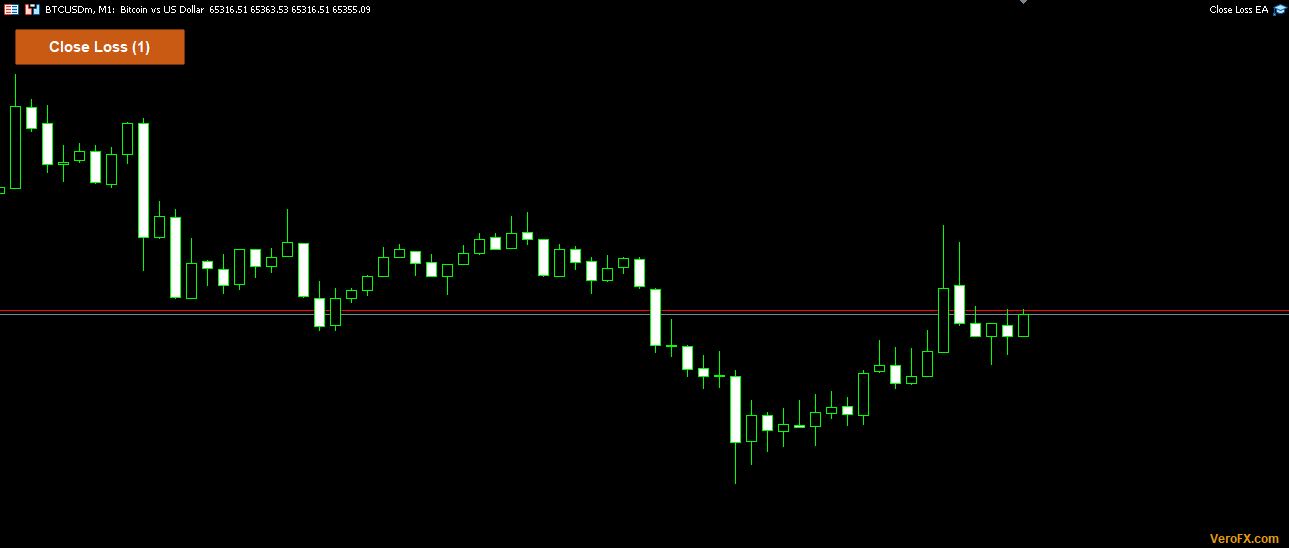
Most “close all” buttons ignore which trades you want to keep. Close Loss EA for MT5 does the opposite: it adds one button to the upper-left of your chart that closes only the positions currently in the red on that chart’s symbol, and it skips everything else.
Which Positions the Red Button Takes and Which It Skips
| Position on the chart’s symbol | Closed by the button? |
|---|---|
| Profit plus swap below zero | Yes |
| Profit plus swap above zero | No |
| Profit plus swap exactly zero | No |
| Positions on any other symbol | No |
| Pending orders | Not touched |
The test is applied to each position separately. The button label shows the current number of losing positions, for example “Close Loss (3)”. A one-second timer refreshes it, so the number stays current without waiting for a new tick.
It works with all magic numbers. Manual trades and positions opened by other EAs are all judged by the same rule.
What Happens After You Press Close Loss
The EA recounts the losing positions first. If none qualify, it writes a note to the Experts tab and stops.
If the confirmation prompt is on, a Yes/No box names the symbol and the number of trades. Answer No and nothing changes. After a Yes, the EA checks that Algo Trading is allowed. If it is off, an alert tells you to enable it and no trade is closed.
Then it sends a market close for each qualifying position by ticket, using your slippage limit. If a broker rejects any close, the EA waits 2 seconds and tries again, up to 10 attempts per click. If positions are still open after the last attempt, an alert reports how many are left and points you to the Experts log for the reason codes.
Settings: A Slippage Limit and a Safety Prompt
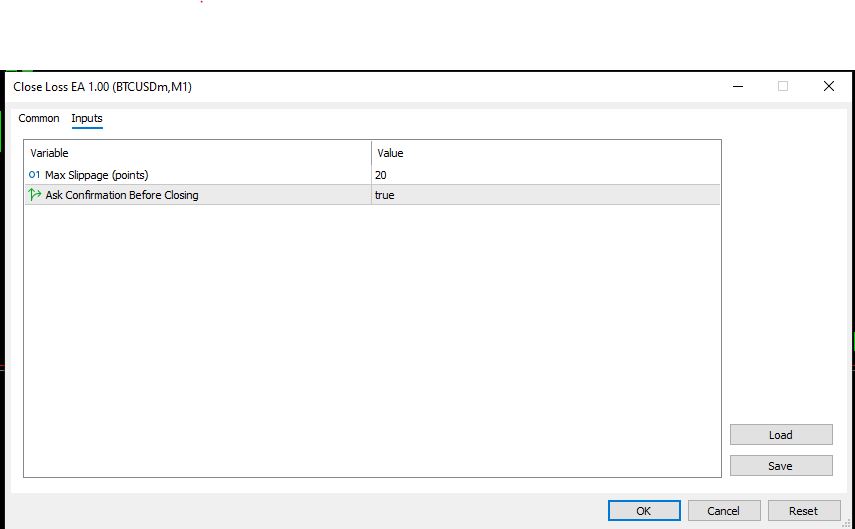
- Max Slippage (points), default 20: the largest price deviation you accept when a close order is filled.
- Ask Confirmation Before Closing, default true: keeps the Yes/No box in place. Set it to false and the next click closes immediately.
A small “VeroFX.com” label appears in the lower-right corner of the chart. Clicking it shows the site address in an alert.
Setting Up Close Loss EA on an MT5 Chart
This EA is for MetaTrader 5. Compatibility may vary by broker and account type.
Copy the EA file into the MQL5\Experts folder from File > Open Data Folder, refresh the Navigator, and drag the EA onto a chart. Turn on Allow Algo Trading.
Attach it to one chart per symbol where you want the button, since it acts only on its own chart’s symbol. It does not open trades, so it only needs the terminal open and connected when you click. Test it first on a demo account to see how the counter and the prompt behave.
Cutting Losers by Hand: Who Benefits and Who Should Look Elsewhere
This suits traders who manage several open positions manually and want to clear the losing ones in one action. It also suits anyone who runs multiple strategies on one symbol and wants a manual override for the losing side only. Because swap counts toward the test, the swap info long short swap rate indicator can show what a position carries overnight. The trade timer open trade duration indicator can show how long each trade has been open.
It is not an automatic stop-loss, and it does not protect your account while you are away. Nothing closes until you click. It also will not help if you want one click across every symbol, or rules for entries and exits.
Where Closing Only the Losers Can Backfire
- A close turns a floating loss into a realized one. That cannot be undone. Leave the confirmation prompt on unless you are sure.
- The count can change before orders are filled. A position may move above zero after the number was shown, or fall below it right after.
- Your broker controls the fill. Slippage, requotes and wide spreads vary by broker and account type, and a close can execute away from the price you saw.
- Fees are not in the test. Only profit and swap are checked. Commissions or other charges are not part of the calculation.
- Retries stop at 10. Anything still open after that stays open until you close it manually.
- What remains open may be riskier. Closing the losers leaves the winners and any new exposure you add afterward. Review why risk management matters more than strategy before deciding when to use it.
Only risk an amount you can afford to lose.
Questions About Break-Even Trades, Swap and Algo Trading
Does a trade sitting at exactly zero get closed?
No. A position is closed only when its profit plus swap is below zero. Break-even and profitable positions are left alone.
Does swap count toward whether a trade is losing?
Yes. The test adds the position’s swap to its profit. A trade with a small gain but a larger negative swap is treated as losing.
Can I use it on gold while I am looking at a Bitcoin chart?
No. The EA acts only on the symbol of the chart it is attached to. Attach another copy to the gold chart to get a button there.
Why did nothing close when I clicked?
Allow Algo Trading may be off. In that case an alert appears and no trades are closed. Otherwise, check the Experts tab for a close-failed message with the broker’s reason code.
Disclaimer
This product is provided for educational and analytical purposes only and is not financial advice. Forex and CFD trading involves a high level of risk, and you can lose some or all of your capital. Leverage can magnify both gains and losses. No product can guarantee profits, and results vary. Never trade with money you can’t afford to lose.
Expert Advisors execute trades automatically and can incur losses, including during unusual market conditions, news events, or technical failures. Backtested or past results don’t guarantee future performance. Test on a demo account first and understand the settings before using real funds.
MetaTrader, MT4, and MT5 are trademarks of their respective owners. This product is not affiliated with or endorsed by MetaQuotes Ltd.