Grand Master V3 RSI Pending Order Expert Advisor for MT5
- Instant Download
- Lifetime Access
- Free Updates
- 24/7 Support
Code: EX28541
Grand Master V3 does not buy the moment RSI turns oversold. It waits, places a Buy Stop above that candle’s high, and then moves the order closer to price as new candles form. It is an RSI expert advisor for MT5 built around that trailing pending entry, with three stop-loss types and an optional lot multiplier you should understand before enabling.
Trailing Buy Stop and Sell Stop Entries, Three Stop Types and Session Limits
- RSI-triggered pending orders. RSI below the oversold level (30) creates a Buy Stop. RSI above the overbought level (70) creates a Sell Stop. The RSI period (14) and RSI timeframe (1 minute) are inputs.
- An entry buffer. Orders sit a set number of pips beyond the signal candle’s extreme (20 by default).
- Three ways to place the stop-loss. Choose a fixed distance (100 pips), an ATR-based distance (length 14, multiplier 1.5), or a candle high/low stop with its own buffer, minimum and maximum.
- A fixed take-profit. The default is 100 pips.
- Direction control. Trade both sides, buys only, or sells only.
- Optional break-even and trailing stop. Both are off by default.
- Optional basket target and daily target. Both are off by default.
- A drawdown cutoff. It is on by default.
- A chart readout. It shows today’s closed profit, cycle loss, current lot step and lot, the live RSI value, and whether a Buy Stop or Sell Stop is active.
From an RSI Reading Below 30 to a Filled Buy Stop
On each new bar of the RSI timeframe, the EA reads RSI from the last closed candle. Below 30, it places a Buy Stop at that candle’s high plus the entry buffer. Above 70, it places a Sell Stop at the candle’s low minus the buffer. An order is only placed if it sits on the correct side of the current price.
After placement, RSI no longer matters for that order. On later bars the order is only moved closer to price: a Buy Stop drops to a lower candle high plus buffer, and a Sell Stop rises to a higher candle low minus buffer. It never moves away. When one order fills, the EA removes its pending orders and manages that single position per symbol and magic number.
The stop-loss and take-profit are attached to the pending order itself. The candle high/low stop uses the previous candle’s extreme plus a buffer (50 pips by default). It then clamps the distance between a minimum (100) and a maximum (500).
Fixed 0.01 Lots by Default, and What Changes When the Multiplier Is Switched On
With the multiplier off, every order uses the start lot (0.01). Switching it on turns the EA into a martingale-style loss-recovery system. Each stop-out raises the lot step, and the next lot is the start lot times the multiplier (1.2) raised to the step number. The result is rounded down to your broker’s lot step, up to a maximum of 100 steps.
Losses are added to a cycle-loss figure. Later wins reduce it, and full recovery returns the step to zero.
With the basket option enabled, orders placed during a loss cycle carry no take-profit. The EA closes all of its positions once their combined profit reaches the cycle loss plus the basket target (5 USD by default). It also deletes any pending orders at that point. The stop-loss stays in place.
Defaults for the RSI, Buffer, Stop and Recovery Inputs
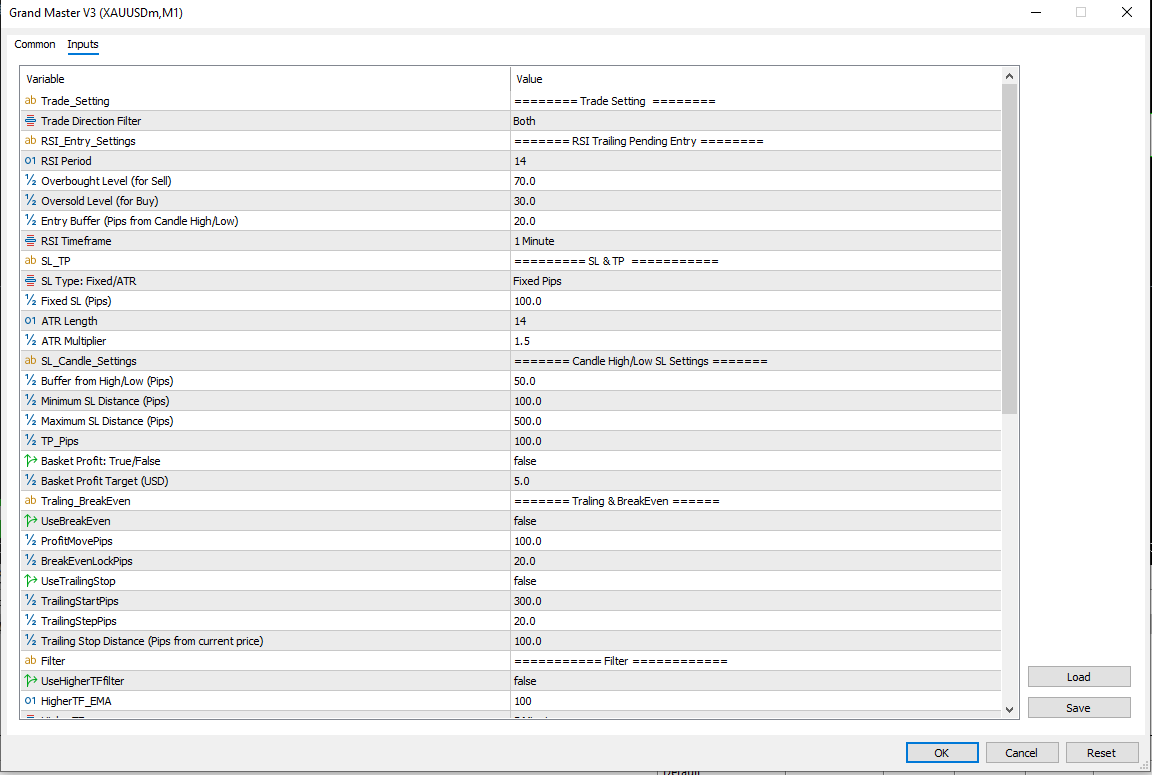
- Entry: RSI 14, levels 70/30, 1-minute RSI timeframe, 20-pip entry buffer, both directions.
- Stops and target: Fixed stop 100 pips. ATR type uses length 14 and multiplier 1.5. Candle type uses a 50-pip buffer with a 100-to-500-pip range. Take-profit is 100 pips.
- Recovery: Multiplier off, start lot 0.01, multiplier 1.2, maximum 100 steps. Basket off, target 5.0 USD.
- After entry: Break-even off, triggers at 100 pips and locks 20. Trailing stop off, starts at 300 pips and keeps the stop 100 pips from price.
- Limits: Daily target off (20 USD), drawdown cutoff on (10,000 USD), slippage 300 points, magic number 8888, trade comment “Grand Master”.
MT5 Setup Notes: Chart Timeframe, RSI Timeframe and the Saved Data File
Grand Master V3 is written for MetaTrader 5. The screenshots show it on an XAUUSDm M1 chart. Compatibility may vary by broker and account type.
Copy the EA file into MQL5 → Experts, refresh the Navigator, drag it onto a chart, and enable Algo Trading. Review the inputs before confirming.
- Two timeframes are in play. RSI and the order-trailing candles use the RSI timeframe. ATR stops and candle high/low stops read the chart’s current timeframe.
- State survives restarts. The EA saves its lot step, cycle loss and daily profit to a data file in the terminal’s common folder and reads them back on start. The file name includes the symbol and magic number.
- The terminal must stay running. Many traders use a VPS for this.
Built for Traders Who Want to Set Their Own Stop Distances and Recovery Limits
This EA suits traders who are comfortable with pending-order breakouts and want to choose between fixed, ATR and candle-based stops. It also suits those who will test the multiplier and step limit carefully on a demo account before any live use.
It is not suited to traders who want a fixed risk per trade tied to account balance, since lots are fixed numbers or multiplier-driven. It is also a poor fit for anyone expecting guaranteed outcomes.
Where Stop Orders, Stale Pendings and a Lot Multiplier Add Risk
- The multiplier compounds quickly. With the defaults (0.01 start, 1.2 multiplier), the lot is about 0.38 at step 20, about 2.37 at step 30 and about 14.7 at step 40, before your broker’s maximum lot applies. Up to 100 steps are allowed.
- A pending order can fill late. Once placed, it stays after RSI returns to normal. It can trigger on a later breakout that no longer matches the original signal.
- Stop orders fill at the next available price. In fast markets that can be worse than the order price, and the EA allows up to 300 points of slippage. Spread Watch is a separate tool for monitoring spread.
- Stops can be wide. The candle-based stop can reach 500 pips, so a single stop-out at a larger lot can be costly.
- The drawdown cutoff is loose by default. It measures the drop from your highest balance to current equity across the account. The default of 10,000 USD would not trigger on a smaller account.
- Execution differs from backtests. Spread, slippage and requotes affect live results.
Test on a demo account, and risk only money you can afford to lose. For more on this, read why risk management matters more than strategy. The volatility bands indicator with ATR and standard deviation can help you judge whether an ATR stop distance suits current conditions.
Pending Orders, Lot Steps and Restarts: Common Setup Questions
Why is my Sell Stop still there after RSI returned to normal?
RSI only creates the order. After that it trails candle lows and stays until it fills, a position opens, the daily target is hit, or the direction setting removes it.
Is the lot multiplier on by default?
No. The default is a fixed 0.01 lot. Turn on the multiplier setting to use the 1.2 multiplier and the 100-step limit.
Does a restart reset the lot step?
No. The EA saves its lot step and cycle loss to a data file and reads them back on start, so an open recovery cycle carries over. A different magic number or symbol uses its own file.
Which timeframe does each part read?
RSI and order trailing use the RSI timeframe. ATR and candle-based stops use the chart’s current timeframe.
Disclaimer
For educational and analytical use only; not financial advice. Forex and CFD trading carries a high level of risk, and you can lose some or all of your capital. No product can guarantee profits, and results vary. Past or backtested results don’t guarantee future performance. Indicators can give misleading or delayed signals, and Expert Advisors can incur losses in unusual market conditions or during technical failures. Test on a demo account first, and never trade with money you can’t afford to lose.
MetaTrader, MT4, and MT5 are trademarks of their respective owners. This product is not affiliated with or endorsed by MetaQuotes Ltd.